Overview
A Philips coffee machine in Dubai is usually one of three things: a fully automatic machine with the LatteGo milk system (the 1200, 2200, 3200, 4300 and 5400 series, with model numbers that start EP), a Senseo pod machine, or a drip filter machine of the HD74 range. They fail in different ways. The automatic ones throw a pattern of lights or a numbered error, the Senseo stops giving a full cup, and the drip machine leaks or brews slowly.
This page works through those faults using Philips' own paperwork: the user manuals for the EP1200, EP2232, EP3241 and EP5446, the Senseo manual for the HD7863 to HD7868 family, a manual for the HD74 drip family, and Philips' support page for error codes. Where a manual says nothing, we say so and do not fill the gap. Where an item comes from a retailer's blog, it is labelled as one. Descaling has its own page, so the steps are not repeated here: see our guide to descaling a Philips machine.
Book a repair and a technician arrives at your address, normally the same day. He names the fault and the price before any part is fitted, and he finishes the job on the spot when the machine allows it. A machine that has to go to the workshop is collected from you.
Philips coffee machine repair in Dubai: what we fix and what it costs
Diagnosis is AED 100 plus 5% VAT. After that, Philips repairs mostly fall between AED 80 and AED 400, and the figure is settled with you before work begins.
A basic drip machine or Senseo costs little to replace. When a repair does not make sense, we tell you before you pay for it.
Which Philips machine do you have?
The model number tells you which section of this page applies. On the automatic machines it starts with EP followed by four digits, and the manual says the data label sits inside the service door. On pod and drip machines it starts HD.
Our service page for Saeco machines is separate. The Philips 3100 manual names Philips or Saeco descaling solution in the same sentence, and the Saeco faults and parts are covered on that page.
Is there a Philips service centre in Dubai?
Philips' UAE contact page lists one location, the Philips Middle East and Africa office at Choueiri Group Building, Dubai Knowledge Village. The page says nothing about coffee machines or domestic appliance repair.
We are an independent technician and not an authorised service partner of Philips. If your machine is under warranty, start with the shop that sold it or with Philips' office, because a repair by anyone else may affect the claim. One Click Dubai is independent of Philips. Our repairs carry our own one-month warranty and do not replace the maker's.
What the lights on a Philips automatic machine mean
The EP2232, EP1200 and EP3241 manuals share one set of warning lights. The table below follows them. A line marked 5400 comes from the EP5446 manual, which uses display icons.
Two of these are not faults. The drink icons going out in turn is the warm-up, and in the EP3241 manual all the drink icons staying lit means ready. The EP1200 manual adds that the AquaClean light turns orange when the filter is used up, after about 95 litres.
A retailer's blog, Barista Life, describes the same lights and adds a hint for the all-lights case: unplug the machine, remove the AquaClean filter, refill the tank and clear a clogged pre-ground chute, plug in, and dispense two or three cups of hot water. It says that if the lights return, the machine should be left off for 30 minutes in case it overheated. That is the retailer's advice, not Philips' wording, but it matches how the 5400 manual treats errors 11 and 14.
Philips error codes and what Philips says about them
Display models show a number. Philips' support page lists six, and the EP5446 manual gives a remedy for each of them. Where the two sources word the meaning differently, both are shown.
For codes 02, 10, 15 and 22 Philips' page says the machine needs to be repaired and asks you to contact them. It does not give meanings. Code 19 is grouped with 11 on the support page, and the manual covers 11 only. The 5400 manual also lists four display prompts that are not faults: fill the water tank, add beans, empty the grounds container and insert the brew group.
The two sources disagree on code 01. A grinder error and a clogged funnel are different things. The remedy in the manual deals with the funnel. If it does not clear, or you hear the grinder labouring, that is the grinder, and we should look at it.
Troubleshooting a Philips automatic machine, row by row
The EP3241 manual has sixteen troubleshooting entries and the EP2232 and EP5446 manuals repeat most of them. Here they are grouped by what you see.
Grounds container and drip tray
Brew group
Taste, temperature and flow
Milk and leaks
Anything that survives the remedy in the table is a repair. A leak after the tank is seated and the tray is empty, a brew group that still jams after greasing, or a grinder noise that keeps changing are the cases we are booked for.
The brew group: weekly rinse, monthly tablet, two-monthly grease
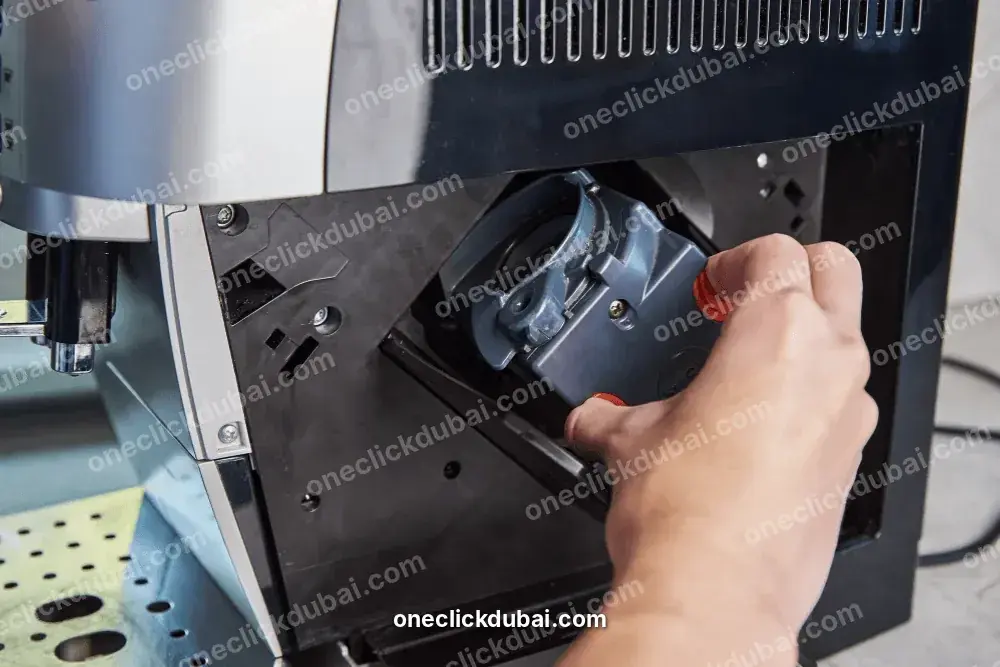
The brew group sits behind the service door and presses the ground coffee. Several of the fault entries above end at it, and the four automatic-machine manuals give it the same routine.
This is the work most owners can do, and it explains many of the faults above: the manuals tie a dirty or dry group to error 03, to watery coffee and to a noise that changes. When we attend a machine for one of those, we clean and grease the group first, because it is the cheapest cause to rule out.
What you cannot do with the group is force it. If it will not come out after the service door is closed, the tank refitted and the machine restarted, stop and book a visit.
LatteGo and the classic frother
LatteGo is the two-part milk system on the front of the machine: a frame and a container. The manuals are specific about its care.
On a machine with the classic frother, the manual says to dispense hot water through it after every use and wipe it with a damp cloth. For daily cleaning, let it cool, pull the metal and silicone parts apart and rinse or wash them, then check that the small hole on the metal tube is clear.
On a classic frother, the manual's check is that the small hole on the metal tube is clear. A LatteGo that leaks has not clicked together, according to the manual. If it clicks and still leaks, a worn seal is the next suspect, and we replace it.
The grinder: twelve settings, one click at a time
The EP2232, EP3241 and EP5446 manuals describe the same grinder: twelve settings, changed with a knob inside the bean container, and a lower number grinds finer and makes stronger coffee.
A grind that is too fine is also one of the causes the manuals give for coffee that comes out slowly or not at all, so the knob is the first thing to check after the tank and the brew group. If the beans are being ground and nothing comes out, the pre-ground chute is the place to look.
A grinding noise that is new, or a grinder that turns and drops no coffee, is not a setting problem. We open the grinder, check the burrs and the motor and clear whatever is jamming it.
Water hardness, the AquaClean filter and scale
Scale is the quiet cause of slow flow, cooler coffee and the Calc / Clean light. Philips' manuals handle it in three steps.
Dip the test strip supplied with the machine into tap water for one second, wait a minute and count the squares that turn red. The EP5446 manual gives that sequence.
The EP2232 manual says to set the number of aroma lights to the number of red squares, and to choose 1 if all squares stay green. The default is 4, which is hard water.
The manuals say the AquaClean filter reduces the need for descaling. The EP2232 table tells you to replace it every three months, and the EP1200 manual says it turns orange when it is used up after about 95 litres.
Descaling is the programme itself, and Philips' manuals call for Philips descaler only. The EP2232 manual warns against descalers based on sulfuric, hydrochloric, sulfamic or acetic acid. The sequence, the volumes and the recovery after a power cut are in our Philips descaling guide.
The EP2232 and EP1200 manuals give no fixed descaling interval and tell you to descale when the Calc / Clean light begins to flash slowly. We do not invent a number.
Senseo pod machines
The Senseo manual covers the HD7863, HD7864, HD7865, HD7866 and HD7868. The strength switch is only on the HD7864, HD7866 and HD7868. The troubleshooting table has five rows.
The on/off light is the only indicator. Flashing slowly means the machine is heating, and if that lasts more than two minutes the manual says to contact Philips Consumer Care. Flashing quickly means not enough water in the reservoir: fill it and seat it properly, and if the float is stuck, empty the reservoir and shake it.
The manual says to descale at least every three months, with liquid Senseo descaler only, and never to interrupt the process. It describes two descaling cycles of about five minutes each and two flushing cycles with fresh water, with half a bottle of descaler in each descaling cycle.
Philips drip filter machines
Its troubleshooting table has a problem and a solution column, with no causes.
The manual advises descaling every two months, or sooner when you see excessive steam or longer brewing. It says to use only white vinegar and does not give a ratio or steps. For a stained insulated jug, it says to leave hot water and sodium carbonate in it for a while, scrub with a soft brush and rinse with fresh water.
The manual gives no wattage. It says to check that the voltage on the appliance matches your supply and to use an earthed socket. On a drip machine that brews slowly, we descale first. One that does not heat after that goes on the repair list.
Vinegar: three Philips machines, three different answers
People ask about vinegar more than any other descaling question, and Philips' manuals do not give one rule.
White vinegar is acetic acid, so the automatic machines' warning covers it. The drip machine's manual says the opposite. The sensible reading is that each manual speaks for its own machine, so check which one you own before you reach into the cupboard.
Specifications and power
The specification tables of the automatic machines agree on the practical points.
Dubai homes are supplied at 230 V and 50 Hz, which matches these ratings. The EP3241 and EP1200 manuals do not print a voltage and send you to the data label inside the service door, so read the label if you imported the machine from elsewhere. The Senseo and drip manuals give no figure either and tell you to match the voltage on the base to your supply.
Use an earthed wall socket, as the Senseo and drip manuals instruct.
Safety
A machine that smells hot, trips the breaker or has a damaged cord is switched off at the wall and left for a visit.
Everyday care that stops repairs
Several of the faults on this page map to a line in this table: a dry brew group, a full container and a spent filter.
Signs that are normal on a Philips
If the sign comes back after the action in the table, treat it as a fault.
What happens on a visit
Ring or send a message with the model number and what the lights or display show.
A technician comes to your door, usually the same day, with the likely parts.
He checks the brew group, the water path, the grinder, the heater and the board in the order the symptoms point.
The figure is agreed with you before any part is fitted.
He runs the machine through a full drink, with milk if it has LatteGo, before he leaves.
The part and the labour carry one month of cover.
A machine that has to go to the workshop is collected, and you are told why and when it will be back.
Repair or replace a Philips?
Our rule of thumb is to price a new machine of the same type and think twice about a repair that costs about half of it.
Before you message us
Still faulty after all six? Switch it off and message us.
What to tell us when you book
Tell us which of the steps on this page you have already done.
Philips coffee machine repair near me: areas we cover
We attend Philips machines across Dubai Marina, JBR, Palm Jumeirah, JLT, Downtown, Business Bay, Jumeirah, Al Barsha, Dubai Hills and Deira. Outside those districts, message us and we will say whether we can come.
Frequently asked questions
How much does a Philips coffee machine repair cost?
AED 100 plus VAT to diagnose, then mostly AED 80 to AED 400 for the repair, agreed before we start.
Is there a Philips service centre in Dubai?
Philips' UAE contact page lists its Middle East office in Dubai Knowledge Village and says nothing about coffee machine repair. We are independent of Philips.
What does error 03 mean on a Philips?
The EP5446 manual says the brew group is dirty or not greased well. Switch off, rinse the group, let it dry, grease it and switch on.
What does error 05 mean?
Air is trapped in the water circuit. Restart and dispense two or three cups of hot water. If it comes back, the tank seat, the filter or the pump needs a look.
My Philips shows error 14. What now?
It is overheated. The manual says to switch it off and on again after 30 minutes.
Why will my Philips brew group not come out?
The manual's remedy is to close the service door, refit the water tank and restart the machine. If it still will not come out, do not force it.
How often should I clean the brew group?
Rinse it weekly, use a Philips oil remover tablet monthly and grease it every two months.
Can I use vinegar to descale a Philips?
Not in the automatic machines, where the EP2232 manual warns against acetic acid products. The HD74 drip manual says to use white vinegar only. The Senseo manual says Senseo descaler only.
How do I descale my Philips?
The steps depend on the series. Our Philips descaling guide covers the 2200, 3200, 3100, 4300 and 5400.
Why does my Philips make weak or watery coffee?
The manual's causes are a dirty or dry brew group. Clean it, grease it and run the five-cup self-adapting run if your model has one.
Why is milk leaking from my LatteGo?
The manual says the frame and the container are not assembled properly. Refit them until they click, and clean both.
Is it worth repairing a Philips coffee machine?
A brew group, seal, LatteGo or tank connection usually is. For a Senseo, a basic drip machine or a board on an old entry-level model, compare the quote with a new machine.
Book a Philips coffee machine repair
Message us on WhatsApp at +971 55 209 9785. Give the model number, the error or lights, and your location.