A Gaggenau fully automatic espresso machine sits in a cabinet, weighs over 20 kg, has a ceramic grinder, magnets in several removable parts and a display that locks the machine if you ignore a descale prompt. It is a built-in appliance, and its manuals treat most faults as display messages. Several of those messages have a remedy that takes a minute, such as pushing the milk tube to the bottom of the container or pressing the water filter straight down.
This page works through the Gaggenau manuals, for the CM 250, CMP 250, CM 450 and CM 470, together with a Gaggenau service directory that lists a Dubai contact. The manuals differ from model to model on programme times, tablet part numbers and even the number of tablets, so the page puts them side by side. Where a manual stops, the page says so.
If your machine needs more than a message cleared, message us. We come to the kitchen, find the fault and give you the price before any part is ordered. Gaggenau's manuals tell owners to have repairs done by customer service, so the page also covers who that is in Dubai and when our visit is the better route.
The visit fee is AED 100 plus 5% VAT. Repairs are quoted from AED 80 to AED 400 depending on the fault, and nothing is ordered or fitted until you agree.
Tell us the model, such as CM 250, CMP 250, CM 450 or CM 470, and the exact message on the display.
Parts are genuine, and the quote includes the labour.
A month of warranty covers what we fit and what we do.
We try to finish in your kitchen. If the machine must leave, we agree the day with you first.
FaultWhat we check or replaceWhere it sits in the range
Flow slows or stops, set capacity not reachedBrewing unit, scale, grind setting, pumpLower to upper
Display message 'Remove brewing unit and clean by hand' keeps returningBrewing unit, its latch and seat, grounds drawerLower to middle
'Refill with still water or remove filter' with a good tankFloat, tank connection, filter seatLower end
Milk will not draw, or a milk-container message persistsMilk tube, container sensor, shelf scalesLower to middle
'Clean trays and replace' or 'Insert trays' with trays in placeTray sensor area, outlet and siphonLower to middle
'Let appliance cool down' returns after 30 minutes offTemperature sensing, heater, ventilationMiddle to upper
Error E0510, or 'Contact after-sales service'Internal fault; diagnosis on siteQuote after inspection
Overvoltage or undervoltage messageSupply first, then the machine's internal supplyLower to upper
A built-in machine costs a great deal to replace, so a quote is worth having. If a repair would come close to the price of a new one, you hear that before work begins.
ModelWhat the manuals say about it
CM 250Manual edition 9007. Water hardness set on levels 1 to 4 with a factory default of 4. Auto switch-off adjustable from 5 minutes to 12 hours. Descaling uses two tablets. Technical figures are on the rating label and are not in the document
CMP 250Document CMP250130/09. A 0.5 litre milk container, cleaning tablet order no. 00311808 and descaling tablet order no. 00310967.
CM 450220-240 V, 1600 W, 19 bar, 2.4 litre tank, 500 g bean container, ceramic grinder, filter order no. 17000705
CM 470The same electrical and capacity figures as the CM 450, a milk container that sits on a shelf with scales, and a service programme selector marked S
The model code is on the rating label. Send a photo of it with the display message when you contact us.
The manuals give several instructions that exist only because the machine lives in a cabinet or is heavy.
Ventilate adequately, and never operate the machine in a unit with the cabinet door closed (CM 450 and CM 470).
Take care not to trap fingers when closing the door, and when sliding the machine in and out of a built-in cabinet (CM 250).
Weight empty. 21 to 22 kg on the CM 450 and 22 to 23 kg on the CM 470.
Protect from frost. If the machine was transported or stored below 0 degrees Celsius, wait at least 3 hours before use.
Use only indoors, at room temperature, up to 2000 m above sea level, for household use.
The machine contains permanent magnets. People with electronic implants such as pacemakers or insulin pumps must keep at least 10 cm away from the machine and from the milk container, milk system, water tank and brewing unit when removed.
The weight and the cabinet are why a workshop job is planned, not improvised. We tell you before we take the machine, and when it will be back.
Voltage and specifications
ItemCM 450CM 470
Electrical connection220-240 V, 50/60 Hz220-240 V, 50/60 Hz
Power1600 W1600 W
Maximum static pump pressure19 bar19 bar
Water tank without filter2.4 litres2.4 litres
Bean container500 g500 g
Power cable1.7 m1.7 m
Dimensions (H x W x D)455 x 590 x 444 mm455 x 590 x 444 mm
Weight, empty21 to 22 kg22 to 23 kg
GrinderCeramicCeramic
The 220-240 V range includes the UAE supply of 230 V. The manuals say to connect only to a correctly installed, earthed socket and only as the rating plate specifies. The CM 250 document gives no electrical figures, so read its rating label.
The CM 470 manual lists an 'Overvoltage or undervoltage' message, with the remedy of contacting the utility and having the supply checked.
The CM 250 manual lists 'POWER FLUCTUATIONS' and says to wait or have the home electrical installation checked.
A message that returns after the supply is confirmed is a machine fault. We test it at your address.
Who services a Gaggenau in the UAE, and what the warranty says
SourceWhat it says
Gaggenau worldwide service directory (a BSH document, edition C)Lists the UAE contact as BSH Home Appliances LLC, Gaggenau Dubai Flagship, CityWalk Building 10, Dubai. A toll-free line and an email address are given. Monday to Saturday, 9am to 7pm, excluding public holidays. The directory has a coffee machine service line for Germany only and none for the UAE. It contains no UAE warranty terms
Gaggenau UAE customer service pageGaggenau experts can service your appliance. The routes are a contact form, a showroom visit by appointment and a dealer locator. No phone number, email or warranty terms are given, and coffee machines are not mentioned in the service text
BSH in the UAEBSH Home Appliances FZE in Dubai is the GCC hub for Bosch, Siemens and Gaggenau, and each brand has its own contact page
CM 250 manualWarranty conditions are defined by the Gaggenau representative in the country of sale; ask the dealer. A bill of sale or receipt is required for any claim. The period and terms are not in the document
CM 470 manualOnly the Aqua-Stop guarantee appears: it covers water damage caused by a fault in the Aqua-Stop system, for domestic customers, for the appliance's service life. It requires correct installation including a genuine Aqua-Stop extension. Defective feed lines or fittings are not covered
So the manufacturer's route in Dubai is Gaggenau's own service line. Ring it before you rely on the number, and ask if your model is covered and for how long. We are an independent technician and not an authorised service partner of Gaggenau.
The manuals say repairs are for customer service only, and the CM 250 says not to open or dismantle the unit. If your machine is within warranty, make the claim first. Where cover has ended, or nobody can name who stands behind the machine, our own one-month guarantee applies to the parts and the work. We have no tie to Gaggenau or BSH.
The CM 450 manual has the fullest list. The CM 250 sorts messages into advisory ones that clear after 5 seconds or on the confirm key, and warning ones that stay until you act.
Message (CM 450)Meaning in the manual
Insert traysDrip tray not inserted or not detected
Milk container connected?Confirm the milk container is connected
Not enough milk for the selected beverageMilk level too low for the drink
Reminder: Is the milk still fresh?Milk reminder interval reached
Reminder: Place milk in the refrigeratorMilk left out when the appliance was switched off
New type of coffee beans in bean container?Confirm to empty the grinder of old beans, or cancel
Set coarser grinding levelCoffee ground too fine
Fill bean containerNo beans in the container, or they are not dropping into the grinder
Please change water filterReplace the filter
Please clean / Please descale / Please descale and cleanRun the matching programme
Appliance locked: Descaling required urgentlyDescaling needed before operation resumes
Remove brewing unit and clean by handBrewing unit soiled or overloaded
Refill with still water or remove filterWater tank incorrectly fitted, carbonated water, or a faulty filter
Clean trays and replaceDrip tray soiled or wet
Let appliance cool down / Switch off applianceAppliance too hot; switch off for about 30 minutes
High or low voltageSupply voltage out of range; contact the utility
Error: E0510 / Contact after-sales serviceFollow the display; call the hotline
CHECK WATER TANK, INSERT WATER TANK, REFILL WATER, REFILL COFFEE BEANS.
EMPTY TRAYS, INSERT TRAYS.
FILL GROUND COFFEE AND CLOSE DRAWER.
CLEAN BREWING UNIT, INSERT BREWING UNIT, CLOSE DOOR.
TEMPERATURE TOO LOW, then wait briefly.
POWER FLUCTUATIONS, then wait or have the installation checked.
CALL AFTER-SALES SERVICE.
The CM 470 manual calls E0510 an internal fault and says to follow the display and call the hotline. It gives no further cause, so the diagnosis happens with the machine open.
ProblemCause in the manualRemedy in the manual
Set capacity not reached; dispensing slows or stopsClogged brewing unit or limescaleClean the brewing unit; descale
Ground coffee sticks in the drawerDrawer damp or blocked; coffee compactedClean and dry the drawer; do not compact the grounds
Brewing unit will not insertRed latch in the wrong positionFollow the insertion steps in the manual
Remove brewing unit and clean by handSoiled or stiff brewing unitClean it; add no more than two level spoons of grounds
Grind adjustment stiffToo many beans in the grinderMake small changes only; clean the grinder
Bean container sticksBeans in the housingRemove the beans
Fill bean container shown with a full containerOily beans stickingTap the container gently; wipe the empty container dry
MessageCause in the manualRemedy in the manual
Overvoltage or undervoltagePower supply out of rangeContact the utility; have the supply checked
Let appliance cool downAppliance too hotSwitch off for 30 minutes
Switch off applianceAppliance too warmLet it cool
Error: E0510, or Contact after-sales serviceInternal faultFollow the display; call the hotline
ProblemCause in the manualRemedy in the manual
No cremaUnsuitable bean type, for example too few robusta, or stale beansUse fresh beans with a higher robusta share
SourGrind too coarseSet a finer grind
BitterGrind too fineSet a coarser grind
BurntBrew temperature too highLower the temperature
Too weakStrength setting too lowSelect stronger coffee
Hot water milky or tasting of milk or coffeeResidue in the dispenserClean the beverage dispenser
ProblemCause in the manualRemedy in the manual
Water filter not seatedNot pressed in fullyPress it firmly straight down into the tank connection
Refill with still water or remove filterFloat stuck, wrong tank insertion or faulty filterReinsert the tank correctly, clean the float, rinse or replace the filter
Tank not filling automaticallyFloat stuck, tap off or tank misalignedClean the float, open the tap, insert the tank to the stop
Clean trays and replaceSoiled or wet tray, or blocked outlet or siphonClean and dry the tray; clear the outlet and siphon
Insert trays with trays insertedSoiled tray holder, or residue container not fully inClean inside; push the container fully in
Water under the drip trayCondensationInsert the drip tray with its filter
Milk container connected? with the container connectedContainer outside the sensor range or unrecognised materialPlace it at the right edge; confirm the prompt or use the supplied container
No milk despite a full containerMilk tube not deep enoughPush the tube to the bottom
No milk message with the container emptyShelf (scales) soiledRemove and clean the shelf and the area beneath
Almost every row is an owner check. The rows that are not are the ones that come back after the remedy: a flow that stays slow after a clean and a descale, a tray message with a clean tray holder, and a float that sticks again. Those are for a technician.
Descaling and cleaning programmes compared
ItemCM 470CM 450CM 250
CleaningAbout 5 min; tablet in the ground coffee drawerAbout 5 min; cleaning tablet order no. 00311769About 7 min; tablet in the grounds drawer
DescalingAbout 21 min; one descaling tablet in 0.5 l lukewarm water to the 'calc' markAbout 21 min (19 min run plus 2 min rinse); descaling tablet order no. 00311819About 25 min; two descaling tablets in 0.5 l; container under the milk frother
CombinedAbout 26 minAbout 26 minAbout 32 min; cleaning tablet plus two descaling tablets
Emptying programmeAbout 2 minAbout 4 min of runs plus manual stepsNot stated
Water filterRemove before descalingRemove before descalingRemove before a service programme and reinsert afterwards
Never use vinegar, citric acid or products based on them. This appears in the CM 470, CM 450 and CM 250 texts.
Do not interrupt a service programme, and do not drink the cleaning or descaling solution.
Do not put descaling tablets in the ground coffee drawer (CM 450 and CM 250).
Wipe the machine down afterwards to remove residue (CM 470).
Service programmes are started from the function selector, marked S on the CM 470.
The tablet part numbers differ between the CM 450 and CMP 250 texts, and the number of descaling tablets differs between the CM 470 and the CM 250. Use the tablets your own manual names. If you cannot find the manual, send us the model code and we will say which document applies.
If a programme is interrupted on the CM 250, the manual says to rinse the tank, fill it to max, place a container under the dispenser and press the confirm key. A cleaning programme of about 2 minutes then runs.
The CM 470 manual says that if descaling is overdue, the appliance locks until descaling is completed. The CM 450 lists the message 'Appliance locked: Descaling required urgently'. A locked machine is not broken, and the cure is the programme, not a service call.
What the manual saysSource
Prompts 'Please descale', 'Please clean' and 'Please change water filter' appear periodicallyCM 470
The frequency depends on use and water hardness; no fixed interval is givenCM 470
Water hardness is set on levels 1 to 4, default 4CM 250
The water filter setting must be correct for the descaling prompts to be correct: Basic settings, Water filter, Available or Not availableCM 450
Replace the filter when the message appears or at the latest after two monthsCM 450
Check that the hardness or filter setting matches what is in the tank. A wrong setting makes the prompts wrong, according to the CM 450 text.
When 'Please descale' appears, run the programme soon. The lock follows if you do not.
A prompt that returns straight after a full programme needs a technician; the manuals do not cover it.
We do not give a calendar interval, because the manuals give none and the prompt is the trigger. A date label under the tank, with the date of each programme, tells you whether prompts are arriving faster than before.
Filter order number on the CM 450. 17000705.
Set Basic settings, Water filter, to Available with a filter or Not available without one.
Fit the filter into the tank, fill to max, and run the rinse with a 0.5 litre container under the dispenser.
Rinse again after a long period of non-use by dispensing a cup of hot water.
Replace on the 'Please change water filter' message, or after two months at the latest.
If the filter is not seated, press it straight down into the tank connection.
The message 'Refill with still water or remove filter' names three causes in the CM 450 text: a tank fitted wrongly, carbonated water in the tank, and a faulty filter. The CM 470 text gives a float stuck, wrong tank insertion or a faulty filter. They overlap but are not the same list, so check all four.
The milk system cleans automatically with a short steam jet after milk drinks (CM 470).
Clean it manually at least weekly, or more often if needed. take it apart, wash in detergent solution, rinse, dry and reassemble.
On the CM 450 the automatic milk-system clean takes about 1 minute with a 0.5 litre container, from the S position of the function selector.
On the CM 250, weak or runny froth is tied to a dirty frother, holder or air valve, and the manual advises low-fat milk at 1.5% fat and pressing the parts firmly together.
The milk hoses and milk tube are dishwasher-safe at up to 60 degrees Celsius; the milk container is not (CM 470).
The milk system gets very hot. Every manual says to let it cool before touching. Milk residue is also a health matter: the CM 470 notes that soiled parts may pose a health risk.
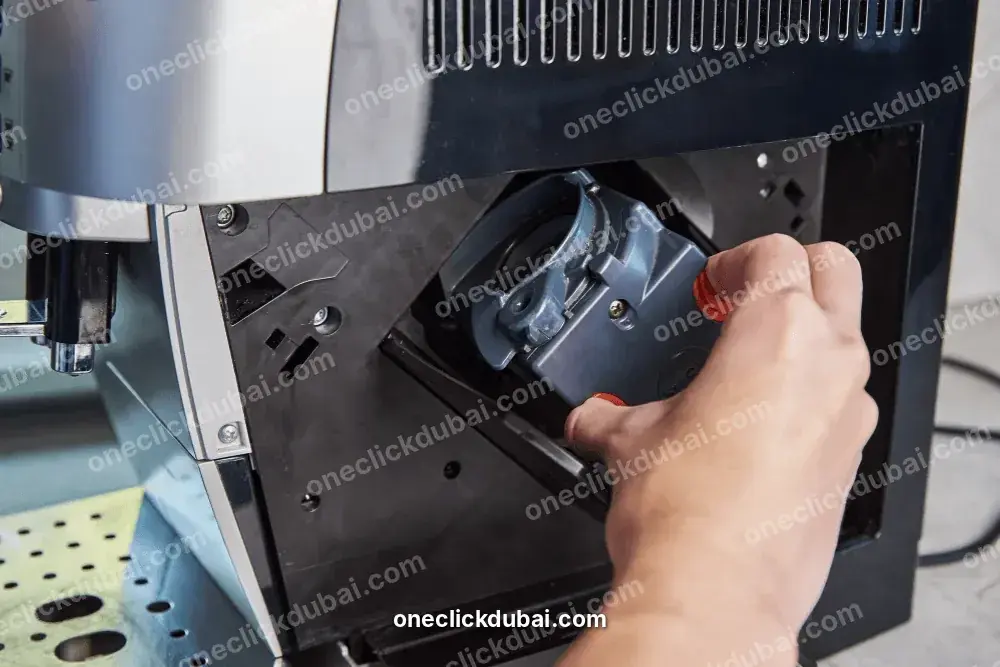
The brewing unit is the part the manuals send you to most often. It is cleaned by hand with water only, no washing-up liquid and no dishwasher, in addition to the automatic programme.
Remove it, rinse it, clean the filter and the taps, dry it, and reinsert with the latch positions as the manual describes.
Use no more than two level spoons of ground coffee when the message 'Remove brewing unit and clean by hand' appears.
On the CM 250, the manual says to lubricate a stiff mechanism with the grease listed as Order No. 311368.
For a unit that will not go in, the CM 470 manual lists the red latch in the wrong position.
Do not reach into the grinding unit, say the manuals. That is separate from the brewing unit, and the instruction is a safety one.
Cleaning and care: what goes in the dishwasher
PartCM 470 manual
Collecting tray, drip tray, filter, coffee residue containerDishwasher-safe, up to 60 degrees Celsius
Milk hoses, milk tube, measuring spoon, beverage dispenser partsDishwasher-safe, up to 60 degrees Celsius
Shelf, accessory drawer, water tank, bean container, ground coffee drawerNot dishwasher-safe
Brewing unit, protective cover, milk containerNot dishwasher-safe
Empty and clean the coffee residue container daily. Clean the drip tray and filter regularly.
Wipe the housing with a soft, damp cloth. Do not use alcohol-based or abrasive cleaners.
The machine rinses itself when switched on or set to 0, unless it was switched off a moment earlier or no coffee was dispensed.
Use a fresh-water programme if the machine is unused for several days (CM 470).
Before transport or long storage, run the emptying programme to clear bean residue and protect against frost.
Aqua-Stop and water leaks
The CM 470 manual says that if water leaks from the inlet hose, you should turn off the tap at once. It also describes an Aqua-Stop guarantee for water damage caused by a fault in the Aqua-Stop system.
Domestic customers only, and for the service life of the appliance.
It requires correct installation as the instructions say, including a genuine Aqua-Stop extension.
Defective feed lines or fittings are not covered.
The manual says the machine does not need supervision, and that the tap needs closing only for a long absence.
A leak from a machine on a plumbed supply is a case where the order matters: tap off first, photograph the damage second, and ring Gaggenau about the guarantee before anyone opens the machine. If the guarantee does not apply, we repair the machine.
Connect only to a correctly installed, earthed socket and only as the rating plate states.
Do not use the machine if the cable or the appliance is damaged. Unplug or cut the mains power at once if a fault occurs.
Only customer service may repair the machine or replace a damaged cable.
Never immerse the machine or the cable in water, and keep the plug and socket dry.
Children under 8 must stay away. Children aged 8 and over may clean or maintain the machine only under supervision.
The milk system and beverage dispenser get very hot.
Do not reach into the grinding unit.
Keep packaging and small parts away from children.
The instruction that only customer service repairs the machine is the manufacturer's. It is the reason the warranty question comes first on this page.
Where the manuals stop and a technician starts
SituationWhat the manuals offerWhat we do
Flow still slow after cleaning the unit and descalingNothing furtherTest pump flow, the brewing unit seat and the water path
Tray messages with clean traysClean the holder, push the container inTest the tray detection and the outlet
'Let appliance cool down' again after 30 minutesSwitch off for 30 minutesTest temperature sensing and ventilation
Overvoltage or undervoltageContact the utilityMeasure the supply, then test the machine
E0510 or 'Contact after-sales service'Follow the display, call the hotlineDiagnose with the machine open, quote on site
Descale prompt returning at onceNot coveredCheck settings, run the programme, test the water path
Warranty questionCountry-of-sale representative; receipt neededTell you what we found; suggest you ring Gaggenau
A manual describes the machine's own checks. A technician can read what it measured.
Offices, restaurants and rented villas
The Gaggenau manuals describes household use. The CM 470 says domestic indoor use only. A machine in a staff kitchen or a rented villa is outside that description.
Put the question to the seller or to Gaggenau. does the warranty cover your use?
Label each cleaning and descaling programme with its date.
Count the milk drinks a day; the manual asks for manual milk-system cleaning weekly at least.
Give us the daily drink count when you book. Commercial machines go on a service plan, and visits follow the volume.
Ask for plan terms when you message us; we do not list a price here.
Buying a Gaggenau second-hand, or after a kitchen sale
The manuals give two things to hold on to at purchase: warranty conditions come from the representative in the country of sale, and a claim needs a bill of sale or receipt. The checklist below is ours.
Read the rating label for the voltage; the CM 450 and CM 470 are 220-240 V.
Ask for the receipt and the model code.
Ask whether the Aqua-Stop extension is genuine and in place.
Check the brewing unit comes out and goes back, and that the red latch moves.
Check the milk container, tube and shelf are present on a CM 470.
Look at the water filter and hardness settings and note them down.
Expect no warranty unless the seller shows one.
A machine that has stood idle needs the fresh-water programme the CM 470 manual describes before it is used.
1
Message usSend the model code and the exact wording on the display.
2
Technician comesA same-day slot is offered if the diary has room.
3
Label and supplyThe label is read and the supply is checked before the cabinet is touched.
4
ChecksBrewing unit, tank and float, trays, milk system, pump and heater.
5
PriceYou hear it first; a part is ordered only after you agree.
6
TestA coffee and a milk drink are made while you watch.
7
CoverOne month on what was fitted and the work.
If the machine has to leave the cabinet, we agree the day with you and give a return date.
The manuals do not say when repair stops being sensible. This is our own view.
FaultOur view
A scale-slowed flow, a dirty brewing unitWorth fixing
Float, tray detection, milk sensorWorth fixing
Pump or heaterGet the quote, then compare it with a new machine
Dead after a supply problemTest first; repair may cost more than the machine is worth
Inside the warranty with a receiptUse the warranty first
When you replace one, get the electrical figures, the filter setting and the warranty period in writing.
Our own sequence, built from the tables above. No tools.
1
Read the displayWrite the exact message down, including capitals.
2
WaterIs the tank seated to the stop, with still water, and does the float move?
3
FilterIs it pressed down, and is the filter setting right?
4
TraysAre the trays and the residue container dry and pushed in?
5
MilkIs the tube at the bottom of the container, and is the shelf clean?
6
Brewing unitDoes it come out and go back, with no more than two level spoons of grounds?
7
DescaleWhen was the last programme, and is the machine locked?
8
Stop thereIf none of it changes the message, leave the machine switched off and message us.
The model code from the rating label.
The exact display message and what you did about it.
Whether the water filter is fitted and which setting is chosen.
The date and type of the last programme.
Whether milk drinks are involved.
The paperwork you have, and where the machine was bought.
Say what you have already tried.
We attend Gaggenau machines in Dubai Marina, JBR, Palm Jumeirah, JLT, Downtown, Business Bay, Jumeirah, Al Barsha, Dubai Hills and Deira. Elsewhere in Dubai, message us to confirm.
How much does Gaggenau coffee machine repair cost in Dubai?
+
AED 100 plus 5% VAT covers the visit. If a repair is needed it is priced between AED 80 and AED 400 by fault, and begins only when you accept.
Is there a Gaggenau service centre in Dubai?
+
A Gaggenau worldwide directory lists BSH Home Appliances LLC at the Gaggenau Dubai Flagship, CityWalk, with a toll-free line, Monday to Saturday 9am to 7pm. It has no UAE coffee machine line, so ask if your model is covered.
What does 'Appliance locked: Descaling required urgently' mean?
+
Descaling is overdue. The CM 470 manual says the machine runs only after descaling, so run the programme with the tablets your manual names.
Can I descale with vinegar or citric acid?
+
No. The CM 470, CM 450 and CM 250 texts all say never to use vinegar, citric acid or products based on them.
How many descaling tablets do I use?
+
One on the CM 470 text and two on the CM 250. Use the number in your own manual.
How long does a descale take?
+
About 21 minutes on the CM 470 and CM 450, 26 for descaling and cleaning together, and about 25 and 32 on the CM 250.
Why does it say 'Remove brewing unit and clean by hand'?
+
The manual says the unit is soiled or stiff. Clean it with water only and add no more than two level spoons of grounds.
Why does it say 'Refill with still water or remove filter'?
+
The manuals list a tank fitted wrongly, a stuck float, a faulty filter and, on the CM 450, carbonated water.
What is Error E0510?
+
The CM 470 manual lists it as an internal fault and says to follow the display and call the hotline. It needs diagnosis with the machine open.
Is my warranty void if you repair it?
+
The manuals say repairs are for customer service, and the warranty period is not in them. If you think a claim applies, make it before anyone opens the machine.
Can I use it in an office?
+
The manuals describe household use. Ask the seller or Gaggenau before assuming office use is covered.
Is it worth repairing a Gaggenau?
+
For a flow, tray, float or milk fault, a quote is worth having. If the figure nears the price of a new machine, we say so first.
Reach us on WhatsApp at +971 55 209 9785 with the model, the display message and your area.